October 16, 2026 · Enablement · Connections

Your connections used to watch. Now they do the work.

Integrations are now Connections, and they do more than collect evidence. The connection that scans Jira or Linear also files fixes in the backlog. Coupa and Zip keep vendor reviews in sync with procurement. Approved fixes get applied for you, then a rescan confirms they held.

What changed

Most setups end with a green tick and a surprise at audit time. The rebuilt setup ends with proof: what we could read, what we couldn’t, and which checks that affects. Connections live in Settings, in the tab that used to be Integrations.
More than scanning
Some connections do more than scan. Jira and Linear take findings into engineering backlogs, Coupa and Zip sync vendor reviews with procurement, and Slack and Teams carry alerts. You choose each job during setup, and each one reports its own health.
Fixes applied for you
Every connection starts read-only. Writing back is a separate grant an admin issues on the connection, scoped to the changes it allows, with an expiry and a reason on record.
Access check
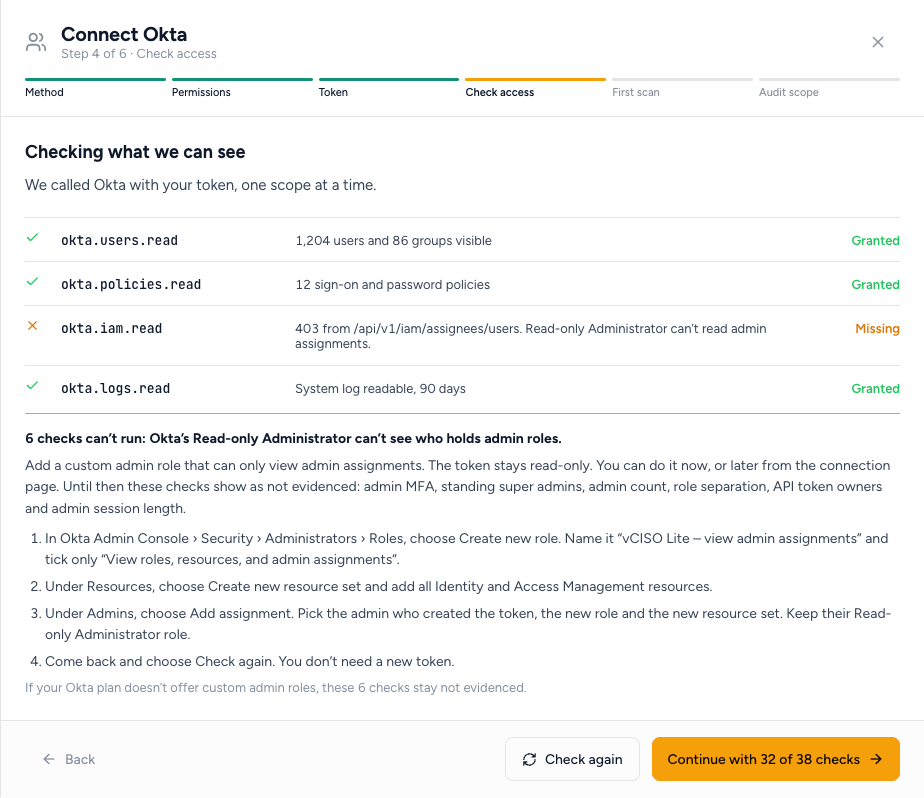
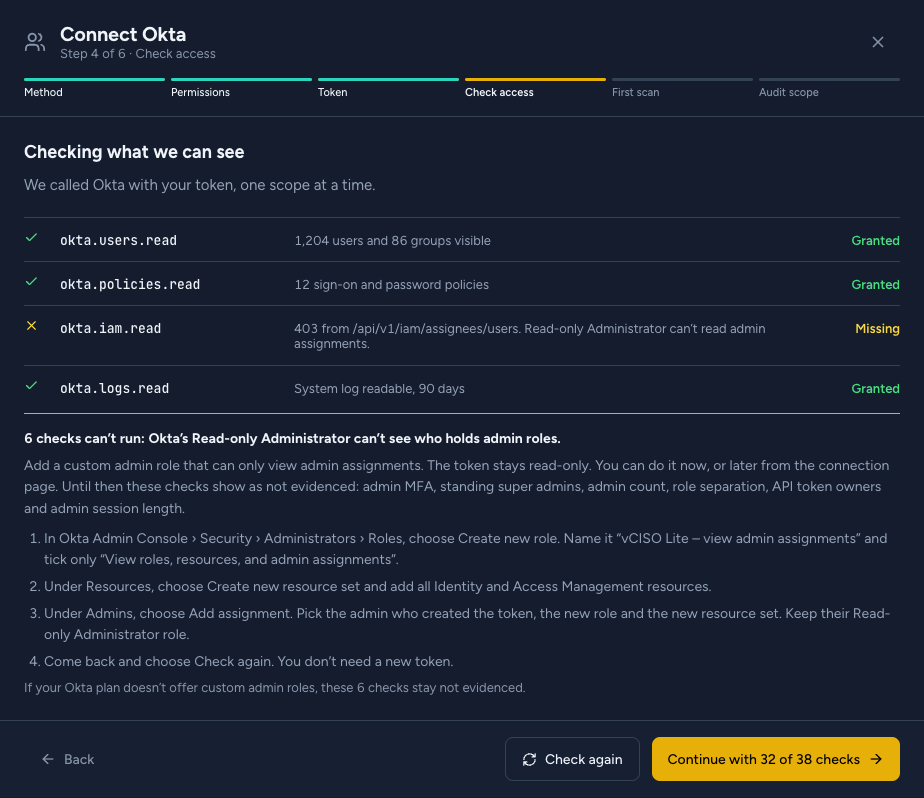
Setup makes one live call per permission with the credential you just gave us. Each permission shows granted or missing, what came back, and the checks it powers. A missing one names the role or scope that adds it, and you don't need a new token.
Partial connections
Connect with what works today, for example 32 of 38 checks. The rest show as not evidenced, never as passing, and the connection page shows how to add them later.
Plan limits
When a vendor's plan doesn't include API access, setup says so, instead of sending you to change a role that won't help. The connection is saved as a draft until the plan changes.
Catalog
Every platform is grouped by what it can do today: connect and scan, import a report, or not connectable yet. Each one shows how many customer tenants it ran on this week and when it last succeeded. New connections say they're new, and if our own daily run of a connection fails, its catalog entry says so.
Audit scope
After the first scan, setup asks which assessments the system belongs to. Results only count toward an assessment once the system is in its scope. Everything is still scanned, and failures still raise fixes.
The Connect Okta drawer on the Check access step: three permissions granted, okta.iam.read missing, with the four steps to add a custom admin role and Continue with 32 of 38 checks.
FIG. 1The access check on a real Okta tenant. Two permissions are granted. One is missing, and the callout names the custom admin role that adds it and the 6 checks it blocks.

Why it matters

A connection that silently can’t read half of what it should is worse than no connection. It shows green until an auditor asks for the evidence, wasting the precious time you spent preparing for the audit. Now, with our new Connections (formerly “Integrations”) you find out in setup, while the person with admin rights is still in the room.

“Supported” should mean it worked for someone this morning. The catalog counts real tenants and shows the last success. When a vendor changes something on their side, you see it in the catalog before you see it in a failed scan.

Not every system belongs in every audit. Scope keeps an incident-paging tool from dragging down your SOC 2 numbers, without hiding the fact that its admins have no MFA. The full walk-through is on the connections page.

Availability

Shipping today to every platform tier. Open it in your tenant at Settings → Connections.

Nothing you already had is lost. Existing integrations moved to Connections with their history. Each one shows its current access the next time it scans. Every existing assessment starts with all of your connections in scope, so review the scope in each assessment’s Scoping and untick what your auditor won’t test.

Known limitations

“Proven on N tenants” counts from today. Connections that existed before today show their count once they complete a scheduled scan.

Okta's Read-only Administrator can't see admin role assignments. The fix is a custom admin role with one permission. On Okta plans without custom admin roles, those 6 checks stay not evidenced.

Audit scope is set per connection, with account and repository filters for AWS and GitHub. Finer scope, down to a single resource, isn't available yet.

Write grants cover AWS, GitHub, Google Workspace and Microsoft Entra ID. Every other connection fixes through guided steps or a pull request.